How to Verify an Employer on OnlineJobs.ph (and Avoid Job Scams)
If you job-hunt on OnlineJobs.ph, you've probably seen the warnings: fake recruiters, "training fees," employers who vanish after week one, and offers that feel a little too good. Most of these scams share one weakness — the person behind them isn't a real, paying employer on the platform. And OnlineJobs.ph gives you a free, 30-second way to check exactly that before you commit a single hour of work.
It's called Employer Search, and almost no one uses it. Here's how it works, how to read the results, and what to do when an employer can't be verified.
What is the OnlineJobs.ph Employer Search?
Employer Search is a built-in verification tool on OnlineJobs.ph. You type in an employer's name, business name, or email address, and it tells you whether that person has a real account on the site — and whether that account is a paid, active one with no complaints filed against it. Paying employers have given OnlineJobs.ph a card and agreed to its rules, which is a meaningful filter: scammers rarely pay for an upgraded account just to run a con.
You can use it here: onlinejobs.ph/jobseekers/employersearch. You don't even need to be logged in.
How to verify an employer in 4 steps
- Open Employer Search — go to onlinejobs.ph/jobseekers/employersearch.
- Enter what you know — the recruiter's name, the company name, or (best of all) the email address they contacted you from.
- Click "Search Employer."
- Read the result — it will fall into one of the three states below. Match it carefully; the wording matters.
Pro tip: always search the exact email address the employer messaged you from, not just their name. A name can match the wrong person; an email is unique to one account.
The 3 results you'll see (and what each means)
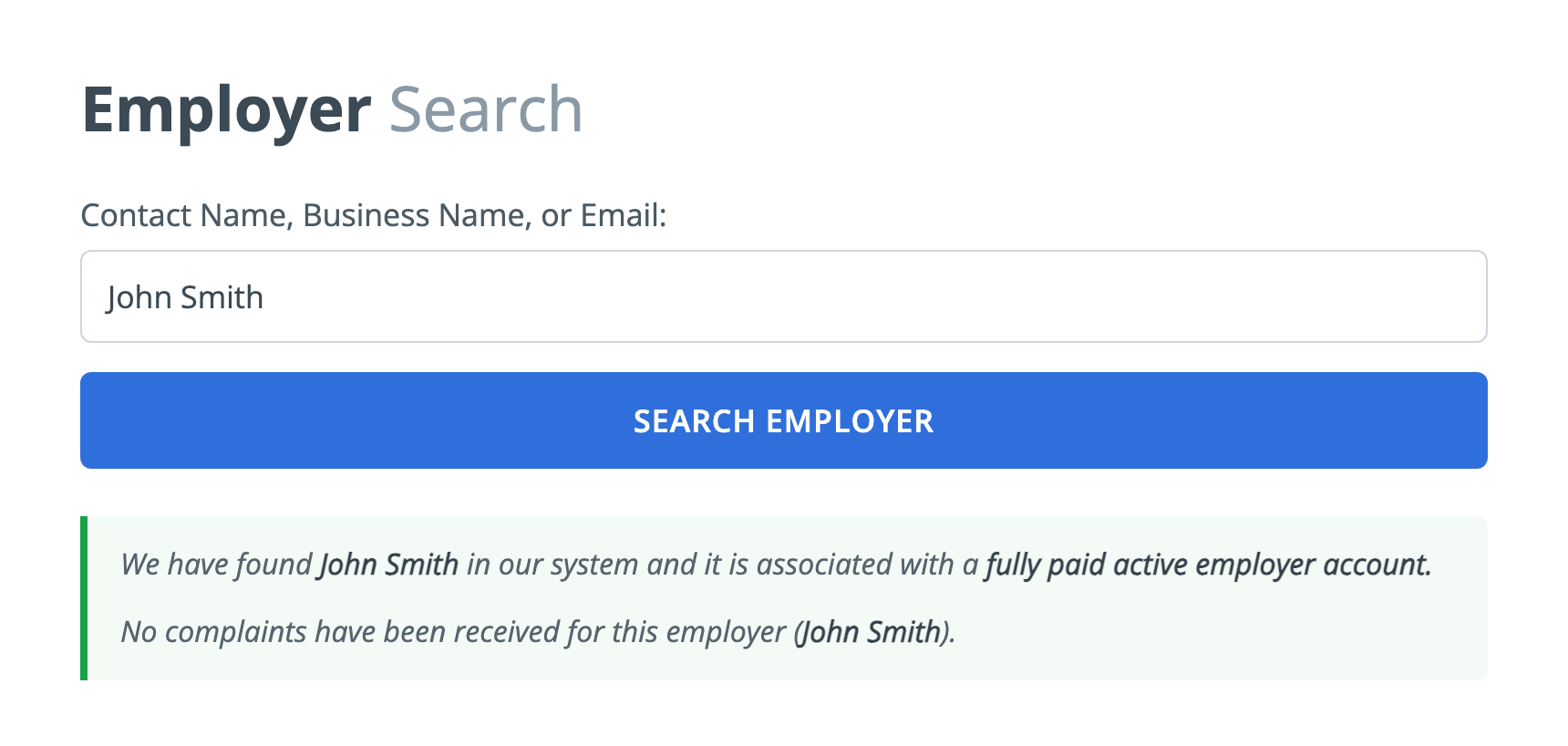
You'll see something like: "We have found [Name] in our system and it is associated with a fully paid active employer account. No complaints have been received for this employer." This is the green light. The employer pays for the platform, is active, and has a clean record. You're also covered by the OnlineJobs.ph jobseeker salary-payment policy.
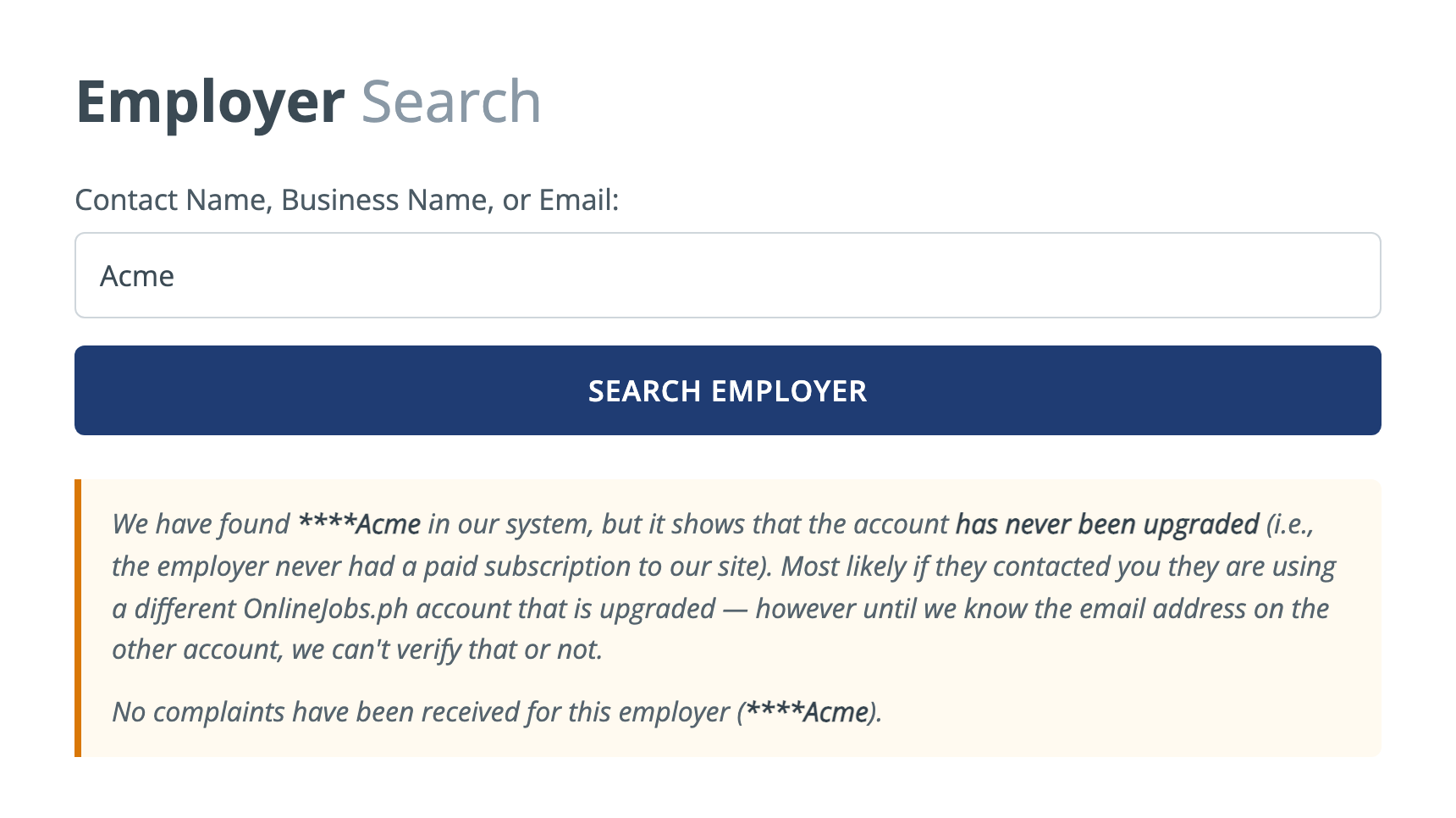
You'll see: "We found [****Name] in our system, but it shows the account has never been upgraded (the employer never had a paid subscription)." This does not automatically mean "scam" — they may be contacting you from a different, paid account. But you can't confirm that yet. Ask them which email is on their upgraded account and search that. If they dodge the question, treat it as a red flag.
If the search returns nothing for the email they used, or it shows complaints, slow down. An employer who recruited you off-platform (and can't be found on it) has none of the platform's accountability. Don't send documents, don't pay anything, and don't start work until you can verify them another way.
Red flags Employer Search won't catch on its own
Verification is one layer, not the whole shield. Walk away — or ask hard questions — if you also see any of these classic scam signals:
- Any upfront "fee" — training, equipment, software, or a "refundable deposit." Legitimate employers never charge you to work.
- Payment in gift cards or crypto, or a request to receive money and forward it on (that's a money-mule scam).
- Instant hire with no real interview, especially over chat apps only.
- Pressure and urgency — "start today or lose the slot."
- Free email + vague company — a "CEO" using a generic Gmail with no website or footprint you can confirm.
- Asking for sensitive data early — full ID, bank details, or passwords before any agreement.
What to do if you can't verify an employer
OnlineJobs.ph actually tells you what to do here: let the employer know you couldn't validate their email on the Employer Search page, and send them the link so they can see it for themselves. A real employer will happily point you to their paid account. A scammer will get defensive, change the subject, or disappear. Either way, you learn what you need to know — before you've risked anything.
Bottom line: 30 seconds in Employer Search, plus a quick red-flag check, filters out the large majority of OnlineJobs.ph scams. Make it the first thing you do with every new offer.
Frequently Asked Questions
Is OnlineJobs.ph legit and safe to use?+
Yes — OnlineJobs.ph is a legitimate, long-running marketplace that connects Filipino virtual assistants with employers worldwide. Like any open job platform, it does attract some scammers, which is exactly why it provides the free Employer Search tool so you can verify who you are talking to before you start working.
How do I verify an employer on OnlineJobs.ph?+
Go to onlinejobs.ph/jobseekers/employersearch, enter the employer’s name, business name, or (best) the email address they contacted you from, and click Search Employer. If it shows a "fully paid active employer account" with no complaints, that’s the safest result.
What does "the account has never been upgraded" mean?+
It means that specific name or email belongs to a free account that never had a paid subscription. It is not proof of a scam — the employer may be messaging you from a different, paid account — but you cannot confirm them yet. Ask which email is on their upgraded account and search that one.
The employer can’t be found in Employer Search. Should I worry?+
Be cautious. If the exact email they used returns nothing, the person has none of the platform’s accountability. Don’t pay anything, don’t send IDs or documents, and don’t begin work until you can verify them another way. Tell them you couldn’t validate their email and send them the Employer Search link.
Should an employer ever charge me a fee to get hired?+
No. Never pay for training, equipment, software, or a "deposit" to get a job. Requests for gift cards, crypto, or forwarding money are scams. A real employer pays you, not the other way around.
Does a verified employer guarantee I’ll get paid?+
Verification dramatically lowers your risk and a fully paid active account is covered by the OnlineJobs.ph jobseeker salary-payment policy, but no single check is a 100% guarantee. Combine Employer Search with the red-flag list, keep your communication on record, and start with a small, paid trial when you can.
Short, practical tips to find legit remote work and dodge scams. No spam — unsubscribe anytime.
One-click unsubscribe anytime.
Comments
Be the first to comment.